
 Alex
Alex DOM-Based Cross-Site Scripting (DOM XSS): Exploiting Client-Side JavaScript Execution for Injections
Imagine a theatre where the script isn’t fixed. Instead, actors adjust their lines based on suggestions whispered by the audience. In such a chaotic setting, a clever intruder could whisper dangerous instructions altering the entire storyline without the directors noticing.
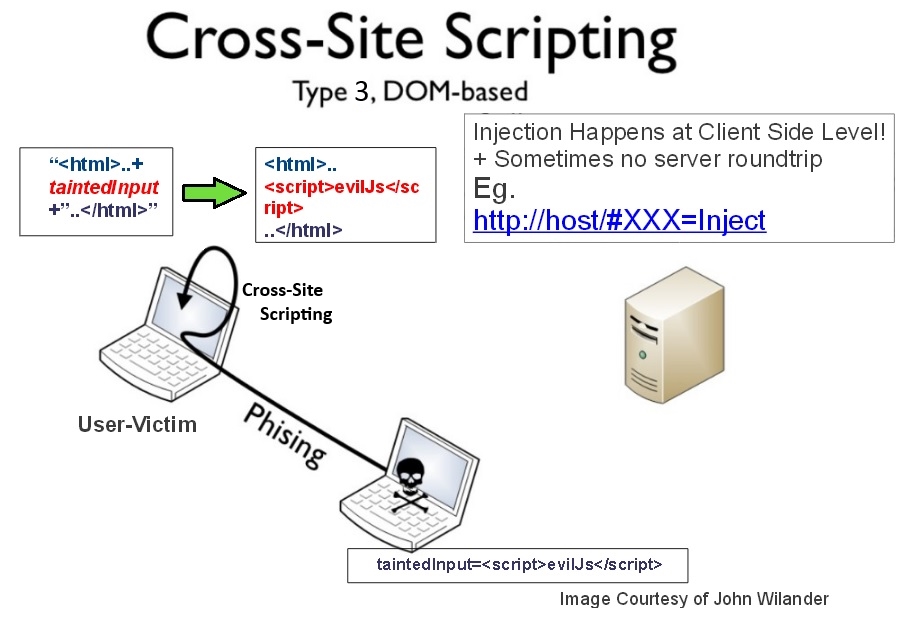
This is the essence of DOM-Based Cross-Site Scripting (DOM XSS): when malicious inputs manipulate the browser’s Document Object Model, tricking client-side JavaScript into executing harmful code. Unlike traditional XSS attacks, DOM XSS never touches the server it lives entirely within the browser’s execution environment.
Why DOM XSS Is Especially Dangerous
Traditional XSS attacks exploit server-side vulnerabilities, injecting malicious scripts into stored or reflected responses. But DOM XSS bypasses servers entirely. It hijacks the client-side logic the scripts, event handlers, URL fragments, and dynamic rendering operations controlled by JavaScript.
Students introduced to web security during full stack classes often learn that DOM XSS is harder to detect and easier to overlook because web servers show no trace of the attack. Everything happens silently in the browser, making it nearly invisible to traditional defenses like input sanitization on the backend.
Where DOM XSS Attacks Hide
Attackers commonly exploit:
- location.hash
- document.URL and document.referrer
- localStorage and sessionStorage
- Client-side template engines
- DOM manipulation methods (innerHTML, document.write)
Any script that consumes untrusted client-side data without validation becomes a gateway for DOM XSS.
How DOM XSS Works: The Invisible Rewrite of the DOM
At its core, DOM XSS is a client-side injection attackers supply malicious data that JavaScript mistakenly treats as executable content.
Step-by-Step Breakdown
- A user visits a legitimate page.
- The page loads JavaScript that reads data from the URL or DOM.
- The script inserts this data into the page using unsafe methods.
- Injected code executes inside the victim’s browser.
- The attacker gains control: stealing cookies, tokens, or performing actions on behalf of the user.
Example Vulnerable Code
const input = location.hash.substring(1);
document.getElementById(“output”).innerHTML = input;
If an attacker sends a link like:
The browser executes the malicious script instantly.
This is equivalent to an audience member whispering a destructive plot twist to the actors and having it performed live.
Dangerous DOM APIs That Enable DOM XSS
Several browser APIs amplify the risk by interpreting user-controlled data as code or markup.
1. innerHTML and outerHTML
Directly inject markup into the DOM often without sanitization.
2. document.write
Writes raw HTML directly into the document, enabling script injection.
3. eval(), setTimeout(), setInterval()
When fed with strings, these functions transform input into executable code.
4. insertAdjacentHTML()
Allows loading HTML fragments without filtering.
5. Client-Side Templates
Some template engines allow unescaped interpolation, enabling injection attacks in dynamic UI components.
Professionals refining secure coding practices in a Java full stack developer course often prioritise identifying and replacing unsafe DOM operations with safer alternatives.
Real-World DOM XSS Scenarios
DOM XSS attacks are not theoretical they have caused major breaches in popular web applications.
Scenario 1: Manipulating Search Fields
A site reads search terms from the URL and displays them dynamically using innerHTML. An attacker crafts a malicious link and distributes it via phishing. When opened, sensitive tokens leak to the attacker.
Scenario 2: Exploiting Third-Party Widgets
A compromised analytics script reads query parameters and inserts them into the DOM. Attackers inject scripts to steal user sessions across multiple websites.
Scenario 3: Browser Extensions
Extensions that trust messages or URL fragments can be tricked into executing scripts with elevated privileges.
Scenario 4: SPA Framework Misconfigurations
Even frameworks like React or Angular can suffer DOM XSS when developers disable built-in sanitization or dangerously use dangerouslySetInnerHTML.
These examples highlight that DOM XSS thrives wherever client-side logic becomes too trusting.
Preventing DOM XSS: A Layered, Defensive Strategy
DOM XSS defense relies on strict validation, safe DOM APIs, and policy enforcement.
1. Avoid Unsafe DOM Manipulation
Replace dangerous APIs with safe alternatives:
- Use textContent instead of innerHTML
- Use DOM methods like createElement()
- Avoid string-to-DOM conversions
2. Implement Strong Input Validation
Even though the server does not handle this data, client-side validation is crucial.
3. Use Trusted Types
Modern browsers support Trusted Types, a CSP-based mechanism that blocks dangerous sinks unless input passes through validated factories. This prevents injections at the API level.
4. Deploy Content Security Policy (CSP)
CSP reduces the impact of DOM XSS by:
- Blocking inline scripts
- Requiring nonces or hashes
- Preventing execution of injected payloads
5. Sanitization Libraries
Use vetted libraries like DOMPurify to safely process dynamic content.
6. Framework Security Features
Angular, React, and Vue include built-in protections use them instead of raw HTML manipulation.
These practices collectively transform the dynamic “theatre” into a guarded stage where audience whispers can no longer manipulate the script.
Conclusion: DOM XSS Turns the Browser Into a Battlefield
DOM-Based XSS is a stealthy, client-side attack that hijacks JavaScript logic, manipulates the DOM, and runs malicious code right inside the browser. Because no server interaction occurs, detection requires a deep understanding of client-side behaviour and precise defensive coding.
Learners attending full stack classes build foundational awareness of how client-side logic interacts with user-controlled data. Those advancing through a java full stack developer course gain hands-on expertise in writing secure DOM operations, implementing CSP, and configuring Trusted Types to prevent injection attacks.
In a world where front-end applications grow increasingly dynamic and complex, understanding DOM XSS is essential. The browser stage must remain secure ensuring no hidden whisper can rewrite the story users trust.
Business Name: ExcelR – Full Stack Developer And Business Analyst Course in Bangalore
Address: 10, 3rd floor, Safeway Plaza, 27th Main Rd, Old Madiwala, Jay Bheema Nagar, 1st Stage, BTM 1st Stage, Bengaluru, Karnataka 560068
Phone: 7353006061
Business Email: enquiry@excelr.com
0 Comment